Custom-resolution signage rarely fails because a file cannot be opened. More often, the native raster exceeds one output, several screens need coordinated but different programs, or an unattended endpoint loses its schedule after an update.
LED media boxes should be chosen from the complete operating pattern: canvas dimensions, decode load, output grouping, local storage, network management, and recovery. The word “box” covers several architectures. One device may feed HDMI, another may add a sending function, and a third may connect directly to LED modules. Their limits cannot be compared through decoding resolution alone.
Turn the Custom Raster into an Output Plan
The wall’s pixel width and height determine whether one endpoint can carry the canvas or whether several feeds must be spliced. LED media boxes need a defined region map for ultra-wide content, including the pixels assigned to each output or cascaded unit. Maximum width, total load, and supported downstream interfaces must all fit the planned arrangement.
For KD2, each unit carries approximately 1.3 million pixels and decodes H.265 content at 4K@60Hz; HDMI-loop connections can join as many as eight units for an ultra-wide display. That structure should be matched to an exact canvas rather than treated as an automatic eightfold solution for every format. The region plan also needs a content-production rule.
A master file built at the complete raster can be divided consistently, while separately authored segments require matching duration, frame rate, and boundary design to appear as one program. A labeled seam test file should remain stored with the project so replacement units can be aligned without waiting for the campaign master to become available.
Separate Decode Capacity from LED Loading
Two independent resource questions apply: which compressed media streams can be rendered, and how many physical LED pixels can be addressed by the output stage? LED media boxes may handle 4K@60Hz content while still having a lower or differently shaped output load.
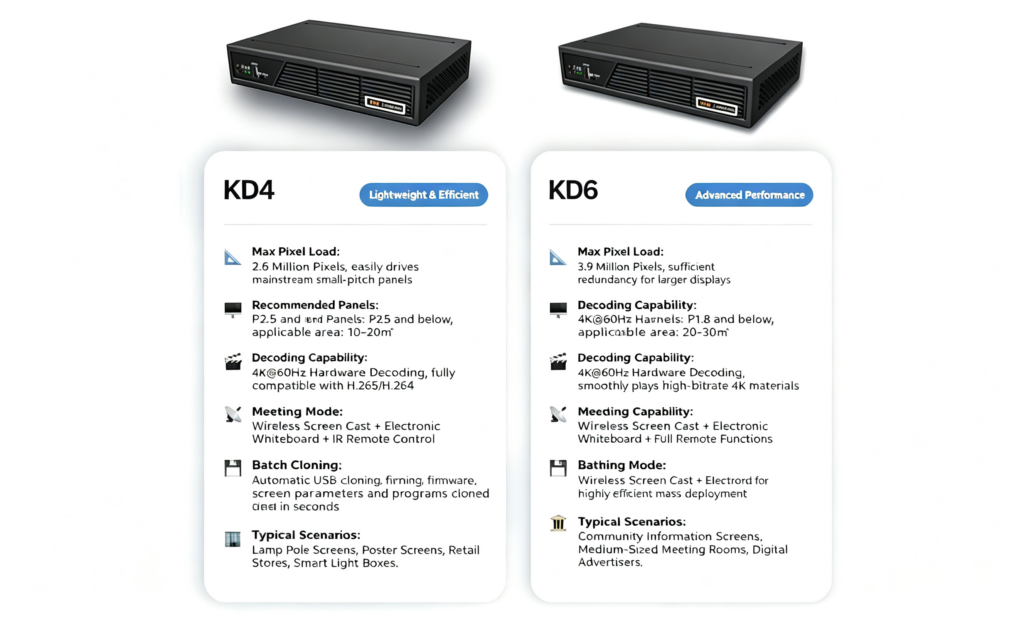
A scene with several video windows also consumes more composition resources than one full-screen file of the same final resolution. For larger cascaded layouts, the KD series can reach 12 units with a combined load of 10.4 million pixels. Its documented capabilities also cover 4K@60Hz decoding, HDMI 2.0 output, dual HDMI input, screen casting, and device cloning.
Model and topology remain important because a family-level maximum does not describe every unit identically. Peak testing should combine the most demanding codec, frame rate, and simultaneous windows expected in the schedule. A box that plays one 4K file smoothly may still be unsuitable for a layout containing several independent video and graphic regions.
Choose the Correct Connection Boundary
HDMI output suits a screen or downstream processor that accepts standard video. A sending function fits an LED control chain, while direct module connections can reduce components in compact products. The LED media boxes selected for a project must own a clearly defined stage so that playback, sending, and receiving responsibilities are not duplicated or omitted.
KPB12 from Kystar provides direct HUB-75E module connection and can also work with Kystar receiving cards. It includes 8GB storage with USB expansion, multi-window playback, sensor and relay interfaces, and cloud management. Those capabilities suit integrated endpoints when their module, load, and peripheral requirements are verified.
Direct connection changes the spare-parts plan because the endpoint now owns functions that might otherwise belong to separate sending and receiving hardware. Replacement procedures should restore both the media project and the LED mapping.
Design Multi-Screen Publishing around Content Roles
Not every screen needs the same program. Stores may share campaign assets but use local schedules; a transport site may combine common notices with platform-specific information. LED media boxes should retain assets locally, expose a unique endpoint identity, and receive controlled playlists rather than relying on one continuous network stream.
Device cloning can accelerate consistent setup, but identifiers, destinations, and schedules must remain distinct where the screens serve different roles. A commissioning record should capture firmware, storage allocation, network settings, active program, time zone, and fallback playlist for each endpoint.
It should also identify the screen group and authorization scope. Grouping makes batch actions efficient, but a mistaken destination can publish the correct campaign to the wrong site or change power and brightness on unrelated screens.
Treat 24/7 Playback as an Operating Model
Continuous operation requires more than a looping file. The LED media boxes need sufficient storage, stable scheduling, monitored status, controlled permissions, and a recovery path for interrupted publishing. Centralized publishing and playback-status monitoring sit alongside scheduled operation, permission control, batch device commands, and resumable interrupted tasks in Kares Cloud.
Drag-and-drop program editing is available through Kystar PE and Pandora tools. Maintenance windows, restart rules, health checks, and fallback schedules convert continuous playback from an expectation into a repeatable operating practice. The same plan should define how deferred updates are introduced safely.
Long-duration validation should include the heaviest playlist, scheduled transitions, a network outage, an interrupted transfer, restart recovery, and confirmation that the fallback program remains available. Status monitoring during the run should record storage, connectivity, playback state, and any restart or transfer fault.
The resulting evidence is more useful than an unattended loop observed only at the beginning and end of the test. The correct endpoint is the one whose raster and interface fit the display, whose decoding and composition fit the content, and whose management record keeps every screen recoverable after the installer leaves.
